AI Agents LangGraph
StateGraph vs MessageGraph
Intermediate
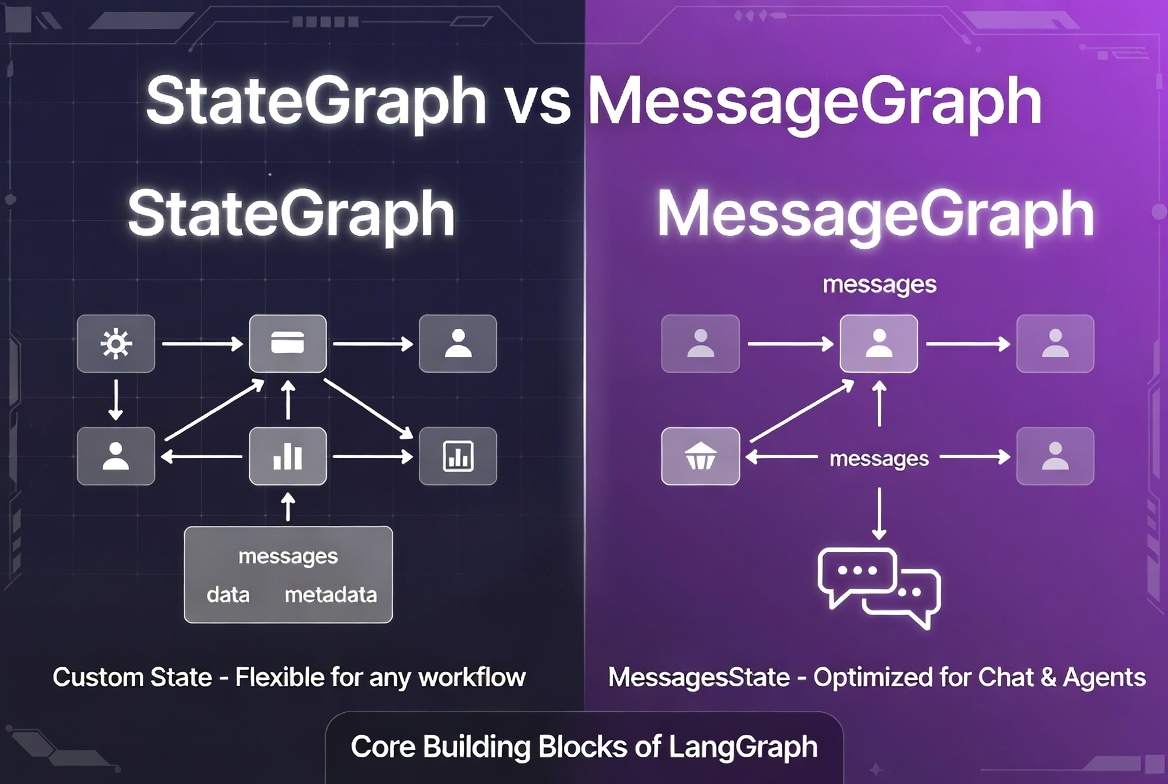
In this topic, we explore the differences between
StateGraph
and
MessageGraph
in LangGraph, how each graph type works, and when to use them in real AI applications. We cover state-based and message-based execution, shared state management, message handling, reducers, memory, routing, tool calling, and multi-agent workflows.
We also compare flexibility, performance, simplicity, and scalability, discuss modern LangGraph best practices, and explain why most advanced AI agents are built using
StateGraph
. Finally, we review common mistakes and best practices for designing clean and maintainable graph architectures.
StateGraph vs MessageGraph
Before developing an AI agent in LangGraph, we first create an instance of either
StateGraph
or
MessageGraph
. We then build the workflow by adding nodes and edges to the graph. In this topic, we explore these two core LangGraph graph classes.
What Is StateGraph?
StateGraph
is the main and most flexible graph builder in LangGraph. It allows you to define your own custom state schema and build complex, stateful workflows.
You explicitly define what your state should look like (using
TypedDict
,
Pydantic
models, etc.), and LangGraph handles merging updates from each node according to the rules you set (reducers).
Use Case: Any kind of workflow: agents, RAG, multi-step reasoning, business logic, etc.
from typing import TypedDict, Annotated
from langgraph.graph import StateGraph, START, END
from langgraph.graph.message import add_messages

class AgentState(TypedDict):
    messages: Annotated[list, add_messages]
    next: str
    iterations: int

graph = StateGraph(AgentState)   # ← Define custom state

graph.add_node("agent", agent_node)
graph.add_node("tools", tool_node)

graph.add_edge(START, "agent")
graph.add_conditional_edges("agent", route_tools)
graph.add_edge("tools", "agent")

graph.add_edge("agent", END)
What Is MessageGraph?
MessageGraph
is a specialized, simplified subclass of StateGraph designed specifically for conversational and chat-based applications.
It comes with a pre-defined state: just a list of messages. You don’t need to define your own state schema.
Each node receives a list of messages and should return one or more new messages. LangGraph automatically appends them using the
add_messages
reducer.
from langgraph.graph import MessageGraph, END
from langchain_core.messages import HumanMessage, AIMessage

graph = MessageGraph()   # No state schema needed

def chatbot(state):
    response = llm.invoke(state)          # state is list of messages
    return [AIMessage(content=response.content)]

graph.add_node("chatbot", chatbot)
graph.set_entry_point("chatbot")
graph.add_edge("chatbot", END)

app = graph.compile()

result = app.invoke([HumanMessage(content="Hello!")])
Why LangGraph Has Two Graph Types
| Aspect | StateGraph | MessageGraph |
|---|---|---|
| Flexibility | Very High | Limited |
| State Definition | User-defined |
Pre-defined (
list[BaseMessage]
)
|
| Best For | Complex agents, RAG systems, multi-agent workflows, tool orchestration | Simple chatbots and quick prototypes |
| Boilerplate | More setup required (define custom state) | Minimal setup |
| Reducers | Fully customizable |
Fixed to
add_messages
|
Reason for both:
- StateGraph gives you full power for production-grade applications.
- MessageGraph gives you speed and simplicity for message-heavy conversational flows.
Core Difference Between StateGraph and MessageGraph
- StateGraph = General purpose → You control the entire state.
- MessageGraph = Opinionated shortcut → Optimized only for messages.
Most developers now use
StateGraph(MessagesState)
instead of
MessageGraph
, because it gives the same simplicity as
MessageGraph
but with the flexibility to add extra fields later.
from langgraph.graph import StateGraph
from langgraph.graph.message import MessagesState

graph = StateGraph(MessagesState)   # ← Most common today
How StateGraph Works
- You define a state schema.
- You add nodes (functions that take state and return updates).
- LangGraph merges the updates using reducers.
- Execution flows according to your edges.
START → Node1 (update state) → Node2 (update state) → ... → END
How MessageGraph Works
- State is automatically a list of messages.
- Every node receives list[BaseMessage].
- Every node returns list[BaseMessage] (or single message).
- add_messages reducer automatically appends new messages.
MessagesState
pre-configured and add_messages as the default reducer.
State-Based Execution vs Message-Based Execution
| Aspect |
State-Based Execution (
StateGraph
)
|
Message-Based Execution (
MessageGraph
)
|
|---|---|---|
| What flows through the graph |
Full custom state (
dict
/ object)
|
Only a list of messages |
| Flexibility | Very High | Limited |
| Use Case | Complex agents, RAG systems, multi-agent workflows, business logic | Simple chatbots and conversational flows |
| State Management | You define reducers for every field |
Primarily uses the
add_messages
reducer
|
| Data Beyond Messages | Easy to store (documents, metadata, tools, memory, etc.) | Difficult and limited |
| Custom State Fields | Fully supported | Limited support |
| Complexity | More advanced | Simpler |
| Scalability | Better for large systems | Better for lightweight chat flows |
| Recommended For | Production-grade AI agents | Beginner-friendly conversational apps |
Message-Based is simpler and faster for basic chat use cases.
State Structure in StateGraph
StateGraph
, you fully control the structure of the state.
from typing import TypedDict, Annotated
from langgraph.graph.message import add_messages

class AgentState(TypedDict):
    # Core conversation history
    messages: Annotated[list, add_messages]

    # Custom fields
    user_info: dict
    documents: list[dict]
    iterations: int
    next: str | None          # Used for supervisor routing
    error: str | None
confidence: float- Every key in the state can have its own reducer (how updates are merged).
- Most common reducer is add_messages for the messages field.
- You can add as many fields as needed.
Message Flow in MessageGraph
MessageGraph
, the entire state is just a list of messages.
from langgraph.graph import MessageGraph
from langchain_core.messages import HumanMessage, AIMessage

graph = MessageGraph()

def chatbot(state):                    # state = list[BaseMessage]
    response = llm.invoke(state)       # LLM gets full history
    return [AIMessage(content=response.content)]   # Must return list

graph.add_node("chatbot", chatbot)
graph.set_entry_point("chatbot")
graph.add_edge("chatbot", END)

app = graph.compile()

result = app.invoke([HumanMessage(content="What is LangGraph?")])
Important : Every node receives the full message history and should return new message(s).
TypedDict and Pydantic in StateGraph
TypedDict
(Most Common)
from typing import TypedDict, Annotated

class AgentState(TypedDict):
    messages: Annotated[list, add_messages]
    documents: Annotated[list, lambda a, b: a + b]   # Custom reducer
iterations: intfrom pydantic import BaseModel, Field
from typing import Annotated
class AgentState(BaseModel):
messages: Annotated[list, add_messages] = Field(default_factory=list)
documents: list[dict] = Field(default_factory=list)
iterations: int = 0
confidence: float = 0.0
graph = StateGraph(AgentState)
Recommendation (2025+):
Use
Pydantic
for better type checking, defaults, and validation.
Use
TypedDict
for simpler, lightweight graphs
Message Objects in MessageGraph
MessageGraph
works exclusively with LangChain message objects:
-
HumanMessage -
AIMessage -
SystemMessage -
ToolMessage -
FunctionMessage(legacy)
from langchain_core.messages import (
    HumanMessage,
    AIMessage,
    ToolMessage
)

def tool_node(state):
    # state is list of messages
    tool_calls = state[-1].tool_calls
    results = execute_tools(tool_calls)

    # Return ToolMessage
    return [ToolMessage(content=results, tool_call_id=tool_calls[0]["id"])]
StateGraph(MessagesState)
, you still work with these same message objects.
HumanMessage, AIMessage, SystemMessage, ToolMessage
| Message Type | Purpose | Common Attributes | Used By |
|---|---|---|---|
HumanMessage
|
Represents user input |
content
|
User |
AIMessage
|
Represents assistant / LLM responses |
content
,
tool_calls
|
LLM / Agent |
SystemMessage
|
Provides instructions or system prompts |
content
|
Developer / System |
ToolMessage
|
Represents the result of a tool execution |
content
,
tool_call_id
|
ToolNode
/ Tools
|
from langchain_core.messages import (
    HumanMessage,
    AIMessage,
    SystemMessage,
    ToolMessage
)

messages = [
    SystemMessage(content="You are a helpful assistant."),
    HumanMessage(content="What is LangGraph?"),
    AIMessage(content="LangGraph is a library for building stateful agents.", tool_calls=[...]),
    ToolMessage(content="Tool executed successfully", tool_call_id="call_123"),
]
messages
field of your state.
Shared State Management
StateGraph
and
MessageGraph
use the same underlying state management system.
-
MessageGraphis actually a thin wrapper aroundStateGraphwith a pre-definedMessagesState. -
The core mechanism (
reducers, merging updates, checkpointers) is identical.
You can easily convert any
MessageGraph
into a
StateGraph(MessagesState)
, they behave almost the same under the hood.
Chat History Handling
messages
field and is automatically managed by the
add_messages
reducer.
from langgraph.graph.message import add_messages
from typing import Annotated, TypedDict

class MessagesState(TypedDict):
    messages: Annotated[list, add_messages]   # ← Magic happens here
How it works:
-
Every time a node returns new messages,
add_messagesappends them. - The full conversation history is passed to the LLM on every call.
- You can trim or summarize history to avoid token limits.
def agent_node(state):
    response = llm.invoke(state["messages"])   # Full history
    return {"messages": [response]}            # New message is appended
Reducers in StateGraph
add_messages
.
from typing import Annotated, TypedDict
from langgraph.graph.message import add_messages
from operator import add

class AgentState(TypedDict):
    messages: Annotated[list, add_messages]           # Append messages
    documents: Annotated[list, add]                   # Concatenate lists
    iterations: int                                   # Last write wins (default)
    metadata: Annotated[dict, lambda a, b: {**a, **b}]  # Merge dicts
Custom Reducer Example:
def custom_reducer(left: list, right: list):
    return left + [x for x in right if x not in left]  # Deduplicate

class AgentState(TypedDict):
    unique_docs: Annotated[list, custom_reducer]
In MessageGraph:
Only
add_messages
reducer is available (and pre-configured).
Memory Handling Differences
| Feature | StateGraph | MessageGraph |
|---|---|---|
| Checkpointer Support | Full support | Full support |
| Persistent Memory |
Yes (
SQLite
,
Postgres
, etc.)
|
Yes |
| Multi-thread / Session Support |
Yes (using
thread_id
)
|
Yes |
| Extra State Fields | Fully supported | Not supported (messages only) |
from langgraph.checkpoint.memory import MemorySaver

checkpointer = MemorySaver()

app = graph.compile(checkpointer=checkpointer)

# Run with thread_id for memory
config = {"configurable": {"thread_id": "user_123"}}
result = app.invoke({"messages": [HumanMessage(content="Hi")]}, config)
Key Difference:
In
StateGraph
you can persist
any
custom fields (documents, user preferences, etc.). In
MessageGraph
you can only persist the message history.
Tool Calling in Both Graph Types
from langgraph.prebuilt import ToolNode
from langgraph.graph import StateGraph, MessagesState

graph = StateGraph(MessagesState)

graph.add_node("agent", agent_node)           # LLM with .bind_tools()
graph.add_node("tools", ToolNode(tools))

graph.add_edge(START, "agent")
graph.add_conditional_edges("agent", route_tools)
graph.add_edge("tools", "agent")
MessageGraph
(Simpler but Limited)
from langgraph.graph import MessageGraph

graph = MessageGraph()

graph.add_node("agent", agent_node)
graph.add_node("tools", ToolNode(tools))

graph.set_entry_point("agent")
graph.add_conditional_edges("agent", route_tools)
graph.add_edge("tools", "agent")Even though
MessageGraph
is simpler, most developers now prefer
StateGraph(MessagesState)
because it allows you to easily add extra state fields later (e.g.,
documents
,
iterations
,
user_id
).
Conditional Routing in StateGraph vs MessageGraph
from langgraph.graph import StateGraph, MessagesState

def route_tools(state: MessagesState):
    last_message = state["messages"][-1]

    # You can also check custom fields
    if state.get("iterations", 0) > 10:
        return "END"
    if last_message.tool_calls:
        return "tools"
    if "research" in last_message.content.lower():
        return "research_node"
    return "END"


graph = StateGraph(MessagesState)
graph.add_conditional_edges("agent", route_tools)from langgraph.graph import MessageGraph
def route_tools(state): # state = list[BaseMessage]
last_message = state[-1]
if last_message.tool_calls:
return "tools"
return "END"
graph = MessageGraph()
graph.add_conditional_edges("agent", route_tools)
StateGraph
,
much more flexible for complex routing.
Multi-Agent Workflows
from langgraph.graph import StateGraph, MessagesState, START, END

def supervisor_router(state: MessagesState):
    last = state["messages"][-1].content.lower()

    if "research" in last:
        return "research_agent"
    elif "code" in last:
        return "coder_agent"
    else:
        return "END"

graph = StateGraph(MessagesState)

graph.add_node("supervisor", supervisor_node)
graph.add_node("research_agent", research_agent)
graph.add_node("coder_agent", coder_agent)

graph.add_conditional_edges("supervisor", supervisor_router)

graph.add_edge("research_agent", "supervisor")
graph.add_edge("coder_agent", "supervisor")

graph.add_edge(START, "supervisor")
graph.add_edge("supervisor", END)
You can also add extra state fields like current_agent, task_status, etc.
MessageGraph
can do basic multi-agent but lacks the ability to store shared context easily.
Streaming Support
StateGraph
gives you more control.
app = graph.compile()

# Stream final state
for chunk in app.stream(inputs, stream_mode="values"):
    print(chunk)

# Stream only messages (very popular)
for chunk in app.stream(inputs, stream_mode="messages"):
    print(chunk)

# Stream updates from specific nodes
for chunk in app.stream(inputs, stream_mode="updates"):
print(chunk)# Custom state streaming
for chunk in app.stream(
{"messages": [HumanMessage(content="Hello")]},
stream_mode="values"
):
if "messages" in chunk:
print("Assistant:", chunk["messages"][-1].content)Persistence and Checkpointing
from langgraph.checkpoint.memory import MemorySaver
from langgraph.checkpoint.sqlite import SqliteSaver

# In-memory (development)
checkpointer = MemorySaver()

# Persistent (production)
checkpointer = SqliteSaver.from_conn_string("checkpoints.db")

app = graph.compile(checkpointer=checkpointer)

config = {"configurable": {"thread_id": "user_123"}}

# Run and save state
result = app.invoke(inputs, config)

# Later, continue the same conversation
result2 = app.invoke({"messages": [HumanMessage(content="Continue...")]}, config)
StateGraph
:
You can persist
custom fields
(documents, user preferences, agent memory, etc.), while
MessageGraph
only persists messages.
Performance Considerations
| Aspect | StateGraph | MessageGraph |
|---|---|---|
| Overhead | Slightly higher (custom state management) | Very lightweight |
| Best For | Complex agents and workflows | Simple chatbots and conversational flows |
| Memory Usage | Depends on your state design | Generally lower |
| Scaling | Excellent with good state architecture | Good for basic use cases |
- Use MessagesState instead of very large custom states when possible.
- Summarize long message histories.
- Use faster models for routing decisions.
- Stream responses to users instead of waiting for full completion.
Flexibility Comparison
| Feature | StateGraph | MessageGraph | Winner |
|---|---|---|---|
| Custom State Fields | Yes | No | StateGraph |
| Custom Reducers | Yes | No | StateGraph |
| Multi-Agent & Supervisor Support | Excellent | Basic | StateGraph |
| Extra Data (documents, metadata, etc.) | Easy | Difficult | StateGraph |
| Development Speed | Medium | Very Fast | MessageGraph |
| Future Extensibility | Excellent | Limited | StateGraph |
| Learning Curve | Slightly Steeper | Very Easy | MessageGraph |
from langgraph.graph import StateGraph
from langgraph.graph.message import MessagesState

# Use this pattern for almost everything
graph = StateGraph(MessagesState)
MessageGraph
+ the full power of StateGraph.
Simplicity vs Control
| Aspect | MessageGraph | StateGraph |
|---|---|---|
| Simplicity | Very High (minimal boilerplate) | Moderate (requires state definition) |
| Control | Limited | Full control over state and reducers |
| Development Speed | Extremely fast for simple chatbots | Slightly slower at the beginning, but scales better |
| Long-term Maintenance | Can become limiting | Much easier to extend and maintain |
MessageGraph
prioritizes
speed and simplicity
.
StateGraph
prioritizes
control and scalability
.
When to Use StateGraph
StateGraph
when you need:
- Custom state fields (documents, metadata, user preferences, iterations, etc.)
- Complex multi-agent or supervisor workflows
- Advanced state management with custom reducers
- RAG pipelines with retrieved context
- Long-running agents that need memory beyond messages
- Production-grade, maintainable applications
from langgraph.graph import StateGraph, START, END
from langgraph.graph.message import MessagesState
from typing import Annotated

class AgentState(MessagesState):          # Inherit from MessagesState
    documents: list[dict] = []
    iterations: int = 0
    next_agent: str | None = None

graph = StateGraph(AgentState)

graph.add_node("agent", agent_node)
graph.add_node("tools", ToolNode(tools))
graph.add_node("retriever", retrieval_node)

graph.add_edge(START, "agent")
graph.add_conditional_edges("agent", route_tools)
graph.add_edge("tools", "agent")
graph.add_edge("retriever", "agent")
When to Use MessageGraph
- Building quick prototypes or simple chatbots
- You only need basic conversation flow
- You want the absolute minimum code
- You don’t need any state beyond message history
- You are experimenting or teaching basics
from langgraph.graph import MessageGraph, END

graph = MessageGraph()

def chatbot(state):
    response = llm.invoke(state)
    return [response]

graph.add_node("chatbot", chatbot)
graph.set_entry_point("chatbot")
graph.add_edge("chatbot", END)

app = graph.compile()
MessagesState
) instead.
Migrating from MessageGraph to StateGraph
# Before (MessageGraph)
from langgraph.graph import MessageGraph

graph = MessageGraph()
graph.add_node("agent", agent_node)
graph.set_entry_point("agent")
# After (StateGraph - Recommended)
from langgraph.graph import StateGraph, START, END
from langgraph.graph.message import MessagesState
graph = StateGraph(MessagesState) # ← Just change this
graph.add_node("agent", agent_node)
graph.add_edge(START, "agent") # Use START instead of set_entry_point
graph.add_edge("agent", END)class AgentState(MessagesState): # Extend MessagesState
documents: list = []
iterations: int = 0
graph = StateGraph(AgentState)Modern LangGraph Best Practices (2025+)
- Prefer StateGraph(MessagesState) over MessageGraph
- Always define your state using TypedDict or Pydantic
- Use Annotated + reducers for all state fields
- Keep custom state fields minimal and purposeful
- Use Command for clean routing + state updates
- Always add checkpointers (MemorySaver or persistent)
- Implement safety limits in all cycles
- Stream outputs (stream_mode="messages") for better UX
from langgraph.graph import StateGraph, START, END
from langgraph.graph.message import MessagesState
from typing import TypedDict, Annotated

class AgentState(MessagesState):
    documents: list[dict] = []
    iterations: int = 0

graph = StateGraph(AgentState)
# ... add nodes and edges
Why Most Advanced Agents Use StateGraph
- Shared memory across multiple agents
- Retrieved documents and context
- Iteration tracking and safety controls
- Supervisor / orchestrator logic
- Persistent custom data (user profiles, preferences, etc.)
- Complex routing and stateful decision making
StateGraph
gives you the architectural flexibility needed for these sophisticated systems, while MessageGraph is mostly suited for simple conversational interfaces.
MessageGraph
= Great for learning and simple bots.
StateGraph
= The standard for serious, production-grade, agentic applications.
Common Mistakes
1. Using
MessageGraph
for Complex State
MessageGraph
by stuffing extra data into messages (e.g., JSON in content, metadata hacks, etc.).
- Hard to maintain
- Loses type safety
- Difficult to debug
- Breaks when you need to scale
def agent_node(state):  # state = list[Message]
    # Bad: stuffing data into message content
    data = {"documents": [...], "user_id": 123}
    response = llm.invoke(state + [HumanMessage(content=str(data))])
    return [response]
StateGraph
with proper state.
2. Overengineering Simple Chatbots with StateGraph
- Unnecessary boilerplate
- Harder to read and maintain
- Overkill for the use case
MessagesState
).
3. Mixing Message State Incorrectly
# Bad
def bad_node(state):
    return {"messages": state["messages"] + [new_message]}  # Manual concat

# Also Bad
return [new_message] # Forgets previous messagesfrom langgraph.graph.message import add_messages
def good_node(state):
return {"messages": [new_message]} # add_messages reducer handles appending4. Poor State Design
- Putting too many unrelated fields in state
- Not using reducers for lists/dicts
- Mutable default values
- No clear ownership of state fields
class BadState(TypedDict):
    data: dict                    # Too vague
    everything: list              # No reducer
    temp: str = ""                # Mutable default
Best Practices
1. Keep State Minimal
class AgentState(MessagesState):        # Inherit from MessagesState
    documents: list[dict] = []          # Only when doing RAG
    iterations: int = 0                 # For safety
    # Avoid: user_profile, full_db_results, etc.
Tip: If a piece of data is only used in one node, consider passing it via message metadata instead of top-level state
2. Use Typed State
from pydantic import BaseModel, Field
from typing import Annotated
from langgraph.graph.message import add_messages

class AgentState(BaseModel):
    messages: Annotated[list, add_messages] = Field(default_factory=list)
    documents: list[dict] = Field(default_factory=list)
    iterations: int = Field(default=0)
    confidence: float = Field(default=0.0)
Or TypedDict (lighter):
from typing import TypedDict, Annotated

class AgentState(TypedDict):
    messages: Annotated[list, add_messages]
    documents: Annotated[list[dict], lambda a, b: a + b]
    iterations: int
3. Separate Messages from Metadata
class AgentState(MessagesState):
    messages: Annotated[list, add_messages]

    # Metadata / Control fields
    documents: list[dict] = []
    iterations: int = 0
    current_task: str | None = None
user_preferences: dict = {}4. Design Clear State Flows
- Document what each field means
- Decide which nodes are allowed to write to which fields
- Use clear field names (retrieved_docs instead of data)
- Keep state flat when possible
class AgentState(MessagesState):
    messages: Annotated[list, add_messages]      # Conversation history
    retrieved_docs: list[dict]                   # From retriever node only
    iterations: int                              # Updated in agent node
final_answer: str | None = None # Written only at the endAI agent LangChain LangGraph Python